What is PHP?
PHP is an open-source, general-purpose scripting language mainly used for building dynamic websites and web applications. It was created by Rasmus Lerdorf in 1994, and its name stands for PHP: Hypertext Preprocessor.
PHP is one of the most widely used server-side programming languages in the world. Its latest version, PHP 8.4.3, was released on January 16, 2025, bringing improved performance and new features.
Key Features of PHP
✔ Server-Side Language
PHP runs on the server and can be embedded directly into HTML to create dynamic web pages.
✔ Cross-Platform Compatibility
It works on major operating systems like Windows, Linux, and macOS, and supports web servers such as Apache HTTP Server, Internet Information Services, lighttpd, and NGINX.
✔ Rich Libraries & Tools
PHP has many reusable libraries available through PEAR, a system for distributing PHP packages, and Composer, a tool for managing project dependencies.
Why Learn PHP?
PHP is one of the most preferred languages for creating interactive websites and web applications. PHP scripts can be easily embedded into HTML. With PHP, you can build:
Web pages and web-based applications
Content Management Systems
E-commerce applications, etc.
A number of PHP-based web frameworks have been developed to speed up web application development. Examples include WordPress, Laravel, Symfony, etc.
PHP Characteristics
Below are the main characteristics that make PHP a very good choice for web development:
PHP is easy to learn
Open-source and free
Cross-platform compatibility
Server-side scripting
Embedded in HTML
Database connectivity
Supports both object-oriented and procedural programming
Large standard library
Supports various protocols
Framework support
Advantages of Using PHP
PHP is a must for students and working professionals who want to become great software engineers, especially in the web development domain.
Some of the most notable advantages of using PHP are listed below:
PHP is a multi-paradigm language that supports imperative, functional, object-oriented, and procedural programming methodologies.
PHP is a server-side scripting language embedded in HTML. It is used to manage dynamic content, databases, session tracking, and even build entire e-commerce websites.
PHP integrates with popular databases including MySQL, PostgreSQL, Oracle, Sybase, Informix, and Microsoft SQL Server.
PHP executes quickly, especially when used as an Apache module on Unix systems. MySQL can efficiently handle complex queries with large datasets.
PHP supports protocols such as POP3, IMAP, and LDAP. It also supports distributed object architectures like COM and CORBA, enabling n-tier application development.
PHP is forgiving and designed to be user-friendly.
PHP has a familiar C-like syntax.
There are five key characteristics that make PHP practical: simplicity, efficiency, security, flexibility, and familiarity.
Popular PHP Frameworks
Here are some of the most popular PHP frameworks:
Laravel: Used for building large and secure web applications.
CodeIgniter: A fast and lightweight framework, suitable for small projects.
Symfony: Ideal for large and complex applications.
CakePHP: Suitable for building fast and secure websites.
FuelPHP: A secure and flexible framework for web development.
Yii: Best for developing modern web applications.
Phalcon: A full-stack PHP framework.
Pixie: A full-stack PHP framework that follows the HMVC architecture.
Slim: A lightweight micro-framework used for creating RESTful APIs and services.
Hello World Using PHP
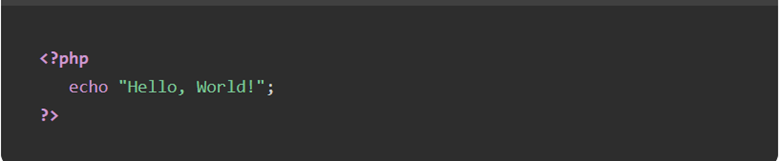
To give you a quick introduction to PHP, here is a simple “Hello World” program. You can try it using the Edit & Run option.

Audience
This PHP tutorial is intended for programmers who have little or no knowledge of PHP but possess a basic understanding of computer programming.
Prerequisites
Before starting this tutorial, you should have a basic understanding of computer programming. Familiarity with HTML, CSS, JavaScript, and databases will be an added advantage.
Download PHP
You can download the latest version of PHP from its official website. Use the following link to access the PHP download page: PHP Downloads & Installation
PHP – Roadmap
This roadmap provides everything you need to become an expert PHP developer. It covers topics ranging from the basics (such as variables, data types, and control structures) to advanced concepts like object-oriented programming (OOP), error handling, and database management.
You will also learn about popular PHP frameworks like Laravel and CodeIgniter, which are essential for building robust web applications. This roadmap includes the tools, best coding practices, and certification guidance needed to help you develop the skills and confidence to write clean, efficient, and secure PHP code for any project.
What is a Tutorial Roadmap?
A tutorial roadmap outlines the learning journey from beginner to advanced level, including key concepts, practical applications, and best practices.
Road Map
PHP Roadmap
This is a PHP Developer roadmap. By following this roadmap, you can become a skilled PHP developer. It is designed for programmers who are new to PHP but have a basic understanding of computer programming.
1. Fundamentals (Beginner Level)
This is where you start your journey.
You learn the basic building blocks of PHP:
- Syntax & Structure – How PHP code is written and executed
- Variables & Data Types – Storing data (strings, integers, arrays, etc.)
- Operators – Arithmetic, comparison, logical operations
- Control Structures – if, else, switch, loops (for, while, foreach)
- Functions – Writing reusable blocks of code
- Arrays – Indexed and associative arrays
Goal: Understand how PHP works and write simple programs.
2. Working with Forms & User Input
Here you learn how PHP interacts with users through web pages.
- Handling GET and POST requests
- Form validation
- Sanitizing user input (security)
- File uploads
Goal: Build interactive websites.
3. Working with Files & Sessions
You learn how to manage data beyond a single page.
- File handling (read/write files)
- Cookies and sessions
- User tracking (login systems basics)
Goal: Maintain user data and sessions.
4. Database Integration (Very Important)
This is a core skill for real-world applications.
- Introduction to databases (MySQL)
- Connecting PHP to database (PDO / MySQLi)
- CRUD operations:
- Create
- Read
- Update
- Delete
- SQL basics
Goal: Build dynamic, data-driven applications.
5. Object-Oriented PHP (Intermediate Level)
Now you move to writing structured and scalable code.
- Classes and objects
- Properties and methods
- Inheritance
- Encapsulation
- Polymorphism
- Namespaces
Goal: Write clean, reusable, and maintainable code.
6. Error Handling & Debugging
Learn how to detect and fix problems.
- Error types in PHP
- Exception handling (try, catch)
- Debugging techniques
- Logging errors
Goal: Build reliable applications.
7. Advanced PHP Concepts
At this stage, you go deeper.
- MVC (Model-View-Controller) architecture
- REST APIs
- Working with JSON
- Composer (dependency management)
- Security best practices:
- SQL Injection prevention
- XSS protection
- CSRF protection
Goal: Build secure and professional systems.
8. PHP Frameworks
Frameworks help you build faster and better.
- Laravel (most popular)
- CodeIgniter (lightweight)
- Symfony (enterprise-level)
You will learn:
- Routing
- Controllers & Models
- Blade templating (Laravel)
- Middleware
Goal: Build modern web applications efficiently.
9. Frontend Integration
PHP works with frontend technologies.
- HTML, CSS, JavaScript
- Bootstrap or Tailwind CSS
- AJAX (for dynamic updates without reload)
Goal: Create complete full-stack applications.
10. Tools & Development Environment
You need the right tools to work efficiently.
- XAMPP / WAMP / LAMP
- Code editors (VS Code)
- Git & GitHub (version control)
- Composer
Goal: Work like a professional developer.
11. Real Projects (Very Important)
Practice is what makes you an expert.
Build projects like:
- Login & registration system
- Blog system (CMS)
- E-commerce website
- School management system (like your Laravel project)
Goal: Gain real-world experience.
12. Deployment & Hosting
Make your projects live.
- Web hosting (shared/VPS)
- Domain setup
- Deploying PHP apps
- Basic server management
How PHP Roadmap Can Help You?
This PHP roadmap includes essential programming concepts, hands-on coding exercises, and valuable learning resources. It helps you plan your learning timeline, apply effective coding practices, and build a strong foundation in PHP development through a clear and structured approach.
Useful PHP Projects
If you want to become a PHP developer, working on real-world projects will help you learn faster. Here are some great PHP projects you can build −
Simple Calculator: A basic calculator that performs addition, subtraction, multiplication, and division.
Login & Registration System: A system where users can sign up, log in, and log out.
To-Do List App: A simple application where users can add, delete, and mark tasks as completed.
Blog Website: A basic blogging platform where users can create, edit, and delete posts.
Online Quiz System: A quiz application where users answer multiple-choice questions and view their scores.
URL Shortener: A tool like Bitly that converts long URLs into short, shareable links.
Chat Application: A real-time chat system where users can send and receive messages.
Gain Experience
Work experience is very important in any field because it reflects a candidate’s skills and knowledge. Students can gain relevant experience through internships during their studies or by working full-time.
PHP Certifications
Obtaining a PHP certification can help showcase your skills and make you stand out in job applications. Some of the top PHP certifications include −
PHP From Scratch Full Course by Tutorialspoint
Zend Certified PHP Engineer by Zend
PHP Certification by Udemy
Coursera PHP Certifications
Oracle Certified Professional
Certified PHP Developer
Prepare for PHP Job Interviews
After acquiring the necessary skills to become a PHP developer, the next step is to prepare for job interviews. These interviews are usually conducted in stages to evaluate both technical and non-technical knowledge.
Skills Required to Become a PHP Developer
To become a PHP developer, you need to learn several important skills. Below is a list of key skills you should have −
Learn PHP basics
Work with databases (MySQL)
Learn HTML, CSS, and JavaScript
Understand PHP frameworks
Learn Object-Oriented Programming (OOP)
Work with APIs
Learn security basics
Practice version control (Git)
Debugging and problem-solving
Build real-life projects
Goal: Put your work online.
Introduction to PHP
PHP began as a small open-source project that grew in popularity as more people discovered its usefulness. Rasmus Lerdorf released the first version of PHP in 1994. Originally, PHP stood for “Personal Home Page”, but it now represents the recursive acronym “PHP: Hypertext Preprocessor”.
Lerdorf started developing PHP in 1993 by writing several Common Gateway Interface (CGI) programs in C to manage his personal homepage. He later extended these tools to handle web forms and interact with databases. This early version was known as “Personal Home Page/Forms Interpreter” or PHP/FI.
Today, PHP is one of the world’s most widely used server-side programming languages for building web applications. Over time, it has gone through many updates and improvements.
PHP Versions
PHP was created by Rasmus Lerdorf in 1994 as a simple set of CGI binaries written in C, known as “Personal Home Page Tools”, which is considered PHP version 1.0.
In April 1996, PHP/FI version 2.0 was introduced, featuring built-in support for DBM, mSQL, and Postgres95 databases, cookies, and user-defined functions.
PHP 3.0 was developed when Zeev Suraski and Andi Gutmans rewrote the PHP parser and introduced the name “PHP: Hypertext Preprocessor”. This version offered better support for databases, APIs, and object-oriented programming, along with improved language consistency.
PHP 4.0 was released in May 2000 and was powered by the Zend Engine. It introduced support for multiple web servers, HTTP sessions, output buffering, secure input handling, and several new language features.
PHP 5.0 was launched in July 2004, driven by Zend Engine 2.0. It introduced a new object model and many additional features. The PHP development community expanded significantly, contributing to projects like PEAR, PECL, and official documentation.
PHP 7.0 was released in December 2015, originally called PHP Next Generation (phpng). It used Zend Engine 3 and brought major improvements in performance, reduced memory usage, return and scalar type declarations, and anonymous classes.
PHP 8.0 was released on November 26, 2020, introducing significant enhancements, including Just-In-Time (JIT) compilation for better performance. Later versions continued improving the language, with PHP 8.2.8 released on July 4, 2023.
How PHP Works?
PHP is a server-side scripting language used to generate dynamic web content. When a user requests a PHP page, the request is handled by the web server, which forwards it to the PHP engine for processing. The PHP script is executed, and the result is converted into HTML, which is then sent back to the browser for display.
Here is a simple step-by-step process of how PHP works −
A user opens a web browser and requests a PHP page.
The web server receives the request and searches for the requested PHP file.
Once found, the server forwards the file to the PHP interpreter.
The PHP interpreter executes the script inside the file.
The script generates HTML output.
The web server sends this HTML back to the user’s browser.
The browser renders and displays the final web page.
Why Use PHP?
PHP is easy to learn and has a straightforward syntax, making it ideal for beginners. It works seamlessly with most web servers and integrates easily with databases like MySQL. Being open-source and free, it has a large global community that continuously improves it. PHP is also cross-platform, meaning it runs on Windows, Linux, and macOS. These advantages make PHP a reliable and cost-effective choice for building dynamic and scalable web applications.
PHP Application Areas
PHP is one of the most widely used languages on the web. Below are some of its key application areas:
PHP is mainly used for server-side web development and is embedded in HTML. It helps manage dynamic content, handle databases, track user sessions, and build full e-commerce platforms.
Although best known for web development, PHP can also be used for command-line scripting and even desktop applications using tools like PHP-GTK.
PHP can generate various types of output beyond HTML, including images, PDF files, JSON, and XML. It can also handle tasks like sending emails and encrypting data.
PHP runs on all major operating systems and supports popular web servers such as Apache, IIS, lighttpd, and nginx. It also supports multiple protocols like HTTP, FTP, IMAP, POP3, LDAP, and more.
PHP Features
Here are some important features of PHP −
PHP can perform system-level operations such as creating, reading, writing, and managing files.
It can handle form data by collecting, storing, and processing user input.
PHP allows you to interact with databases by adding, updating, or deleting records.
It can manage cookies and sessions to track user activity.
You can use PHP to control access to certain pages of a website.
PHP supports data encryption for better security.
It provides access to many reusable libraries and packages through tools like PEAR and Composer.
How PHP Differs from Other Languages?
Here is a comparison of PHP with other popular programming languages −
| Feature | PHP | Python | JavaScript | Java |
|---|---|---|---|---|
| Type | Server-side scripting | General-purpose | Mainly client-side (also backend with Node.js) | General-purpose |
| Use Case | Web development | Web, AI, automation | Frontend and backend development | Enterprise applications |
| Syntax | Simple and C-like | Clean and readable | Dynamic and event-driven | Strict and object-oriented |
| Speed | Fast (especially with PHP 7 & 8 improvements) | Generally slower than PHP | Fast (especially with Node.js) | Typically slower than PHP in web contexts |
PHP – Installation
PHP – Installation
To fully develop PHP applications—especially those involving databases and web servers—you need to install PHP on your local machine. While you can start learning PHP using online compilers, setting up a local environment gives you full control and allows you to build real-world applications.
You can begin with online tools to understand basic concepts. For example, Ngahtech Tutorials’ “Coding Ground for Developers” (coming soon on Ngahtech.com) will allow you to write and run PHP code directly in your browser without installation. Once you are comfortable, you should install PHP locally to work on advanced projects.
Different Ways to Install PHP on Your Local Machine
There are several methods to install PHP depending on your operating system and preference:
1. Install PHP Using XAMPP (Recommended for Beginners)
XAMPP is an easy-to-use package that includes PHP, Apache server, and MySQL database.
Steps:
- Go to the official XAMPP website and download XAMPP for your OS (Windows, Linux, or macOS).
- Run the installer and follow the installation steps.
- Launch the XAMPP Control Panel.
- Start Apache and MySQL
- Open your browser and go to:

- Create a PHP file inside the htdocs folder (e.g., C:\xampp\htdocs\test.php).
- Add the following code:
<?php
echo “Hello, PHP is working!”;
?>
- Run it in your browser:
http://localhost/test.php
3. Install PHP Using MAMP (For macOS Users)
MAMP is commonly used on macOS.
Steps:
- Download MAMP from its official website.
- Install and open the application.
- Start the servers.
- Place your PHP files in the htdocs
- Access your file via:
http://localhost:8888/yourfile.php
4. Install PHP Manually (Advanced Users)
This method involves installing PHP separately without bundled tools.
Steps:
- Download PHP from the official PHP website.
- Extract the files to a directory (e.g., C:\php).
- Add PHP to your system PATH.
- Install a web server like Apache or Nginx.
- Configure the server to work with PHP.
- Restart the server and test with a PHP file.
5. Install PHP Using Command Line (CLI Only)
You can also run PHP without a web server using the command line.
Steps:
- Install PHP manually or via package managers.
- Open Command Prompt or Terminal.
- Create a file:
- Run:
php filename.php
How to Start Running PHP Code
Once PHP is installed:
- Create a .php
- Write your PHP code inside <?php ?>
- Save the file in your server directory (htdocs or www).
- Open your browser and type:
http://localhost/filename.php
- Your PHP code will execute and display the result.
Conclusion
Installing PHP locally allows you to build and test real-world web applications efficiently. Beginners are encouraged to start with XAMPP, WAMP, or MAMP for simplicity, while advanced users can install PHP manually for more control.